Know what’s next.
Home shows the one session to focus on and your next steps, never more than a handful.

Maths with Mr. Salah Bahzad
Recorded maths sessions with Mr. Salah, plus assignments that mark themselves, timed quizzes and a weekly plan that shows what to study next.
Free to sign up · Every account approved by Mr. Salah’s team
Already a student? Sign in or get the app

Sign up free with Google or email. Add your grade, a parent’s phone number and a photo of your ID. Mr. Salah’s team then approves your account.
Approval usually takes [TBD].Get a code card from [TBD: where]. Pick a session, type the code, and it unlocks straight away.
Watch the videos in the Salah Bahzad app, then do the assignment and quiz on any phone, tablet or computer.
Home shows the one session to focus on and your next steps, never more than a handful.
Open-book, one question at a time. Leave and come back; your answers are saved.
Finish an assignment and see your score and the right answers straight away.
Some sessions open with a timed quiz on the one before. Pass it to unlock the videos.
Progress, videos watched, scores and days of access left, on one screen.
Download each session’s PDF notes. They stay open even after your access ends.
Works in any browser on phone, tablet or computer, and you can add it to your home screen. Equations look like equations.


I’m Salah Bahzad, an electrical engineer who became a maths teacher [8+] years ago. I teach hard maths simply: one idea at a time, plenty of practice, and nobody left behind.
“You’ve got this.”
Mr. Salah’s lessons are made for the students who join the class. Here’s how they stay that way.
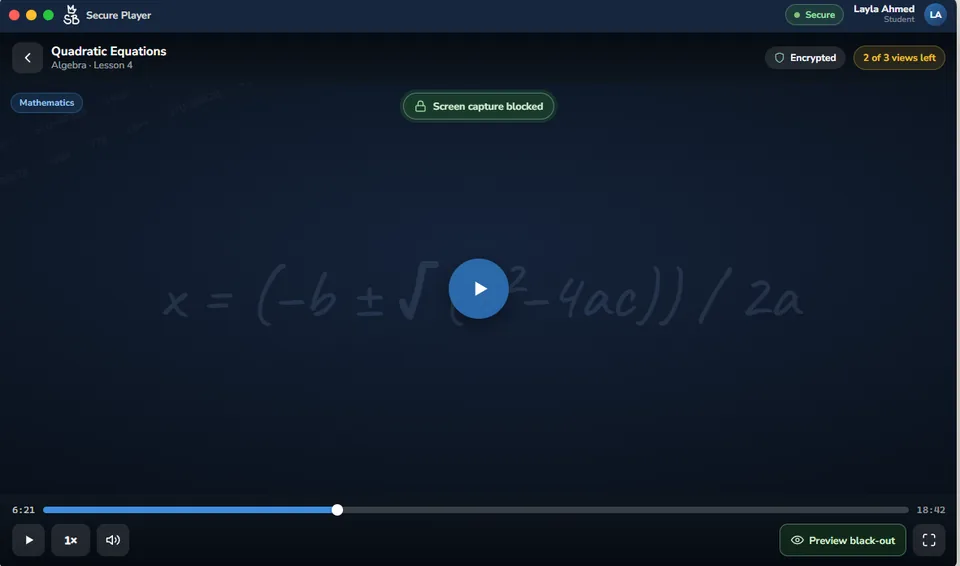
Lessons are encrypted and play only in the Salah Bahzad app. There’s no file to pass around.
Your name and student ID move across every lesson you watch.
They come out black. In the app, on supported devices.
Each video shows how many views you have left, and a view only counts once the video actually starts.
Your account stays yours: one device at a time, and you can switch devices yourself from your profile.

Lessons play in the app. Everything else (sign-up, codes, assignments and quizzes) works in your browser.
Sign up on the web first. The app uses the same account once it’s approved.
iPhone & iPad: iOS 15 or newer
Mac: macOS 10.15 or newer
Until the app reaches your device, you can sign up and do assignments and quizzes here, and watch lessons on a Windows PC.
Android 6.0 or newer
Until the app reaches your device, you can sign up and do assignments and quizzes here, and watch lessons on a Windows PC.
Windows 10 (version 2004 or newer) or Windows 11 · 64-bit
Opens the app if it’s already installed, otherwise the Microsoft Store. The Store must be allowed on the PC; some school or work PCs block it.
On Linux or ChromeOS? Use the student portal in your browser. To watch lessons you’ll need Windows for now, with Android, iPhone, iPad and Mac coming soon.
Continue on your computer? ·
Real, approved students only. Every registration needs a parent’s phone number and an ID photo, and Mr. Salah’s team reviews it before the student can sign in.
You’re the contact on file. The team has your number and can contact you about your child’s enrolment, attendance or results.
A clear weekly routine. Your child always sees what to study next: videos, then the assignment, then the quiz. Ask them to show you their progress and scores; it’s all on their screen.
No online payments, nothing that renews. Sessions are unlocked with prepaid code cards bought from [TBD: where]. The price is shown before a code is used, and no card details are ever entered.
Private by design. ID photos are never public; only staff who need them can open them, and every view is logged. Your child can delete the account at any time.
Questions? Call Mr. Salah’s team on +20 112 311 6565 [TBD: hours]. [TBD: WhatsApp]
Send this page to my parentSessions from EGP 110
[Address]
[Hours]
Map · [Phone]
[Address]
[Hours]
Map · [Phone]
[Address]
[Hours]
Map · [Phone]
“[Real quote, ≤30 words]”
[First name] · [Grade] · [Year]“[Real quote, ≤30 words]”
[First name] · [Grade] · [Year]“[Real quote, ≤30 words]”
[First name] · [Grade] · [Year][e.g. N students scored above X in 2026, source]

Yes. Creating an account is free. You only pay when you redeem a code to unlock a session.
So Mr. Salah’s team can check every student is real and reach a parent if needed. Your ID photo is private and only seen by the staff who need it.
[TBD]. A person reviews every account. Sign in to check your status; if something’s missing you’ll see why, and you can fix it and resubmit.
[TBD: outlets and prices]. Each session shows its price before you redeem. A code works for any session priced at or below its value; no change is given.
The videos and quiz lock, but your assignment and notes stay open. Redeem another code to extend your access.
No. Lessons only play in the Salah Bahzad app, so they stay protected. Sign-up, codes, assignments and quizzes all work in any browser.
Today: Windows 10 (version 2004 or newer) and Windows 11. Android, iPhone, iPad and Mac are coming soon. You’ll need an internet connection.
To keep each account for one student. You can switch devices yourself from your profile, up to [5] times a year; after that, call the team.
Each video has a set number of views, shown next to it. A view only counts when the video actually starts in the app.
No. Lessons stream over the internet and can’t be downloaded; that’s part of keeping them protected.
Some sessions start with a timed quiz on the session before. Do it in one sitting: leaving uses up the attempt. Your best score counts, and you can review your answers afterwards.
Lessons are taught in [TBD: language]. The portal and app screens are in English for now.
From your profile, choose Delete account, or follow the steps at app.mrsalahbahzad.com/account-deletion. Deleting is permanent.
Call +20 112 311 6565 [TBD: hours]. [TBD: WhatsApp]
Create your free account now. Mr. Salah’s team will review it.
